Updating your robot vacuum’s firmware is essential for boosting its cleaning performance and efficiency. Start by ensuring your model’s compatibility with the update. It’s best to charge your vacuum fully and maintain a stable Wi-Fi connection during the process. Pay attention to any error messages and troubleshoot as needed. After updating, test your vacuum to see improvements and new features. If you want to discover more about the update process and its benefits, keep exploring!
Key Takeaways
- Verify compatibility of the firmware with your specific robot vacuum model to avoid issues during the update process.
- Ensure the vacuum is fully charged or docked, and maintain a stable Wi-Fi connection throughout the update.
- Follow the manufacturer’s instructions carefully, consulting the website or user manual for specific guidance on the update process.
- After updating, test the vacuum with a cleaning cycle to observe any performance improvements or new features.
- Set reminders to check for firmware updates regularly to maximize performance and extend the lifespan of your robot vacuum.

Updating your robot vacuum’s firmware is essential for ensuring it runs smoothly and efficiently. Just like any other smart device, your vacuum relies on the latest software to function at its best. New updates can enhance its cleaning capabilities, improve navigation, and even fix bugs that may hinder its performance. So, taking the time to keep your firmware up to date is well worth it.
Before you begin the update process, you’ll want to check for software compatibility. Each robot vacuum model has specific firmware requirements, and using incompatible software can lead to frustrating issues. Make sure that you’re following the manufacturer’s instructions precisely. Typically, you can find this information on the brand’s website or within the user manual. Once you’ve confirmed compatibility, you’re ready to proceed.
When you start the update, make sure your robot vacuum is fully charged or connected to its dock. Interruptions during the update can cause significant problems. If you encounter any error messages during the process, don’t panic. Troubleshooting update issues often involves simple steps like ensuring a stable Wi-Fi connection or restarting the device. Sometimes, just reattempting the update after a few minutes can resolve the hiccup.
After successfully updating the firmware, it’s a good idea to test your robot vacuum right away. Run a cleaning cycle to see if you notice any improvements in its behavior or performance. This is also a great time to explore any new features or enhancements that may have been added with the latest software version. You might find that it now has better obstacle avoidance or improved mapping capabilities, which can greatly enhance your cleaning routine.
Regularly checking for updates is a smart practice. Set a reminder in your calendar every few months to check for new firmware. This way, you can guarantee that your robot vacuum stays in tip-top shape. Remember, keeping your device updated not only maximizes its performance but can also extend its lifespan. Additionally, ensuring color accuracy in your vacuum’s sensors can further improve its navigation abilities.

Thames & Kosmos Dusty Robot Vacuum Cleaner STEM Kit | Build a Desktop Robotic Vacuum with Sensors, Explore Robotics, Engineering & Mechanical Devices, Fun Gift for Ages 8+ or Adults
CONSTRUCTION PROJECT MAKES CLEANING FUN! Assemble this robotic desktop vacuum cleaner that actually works to pick up dust,…
As an affiliate, we earn on qualifying purchases.
As an affiliate, we earn on qualifying purchases.
Frequently Asked Questions
How Often Should I Update My Robot Vacuum’s Firmware?
You should update your robot vacuum’s firmware every few months or whenever the manufacturer releases a new version. Regular updates help guarantee peak performance and firmware compatibility with your home network and other smart devices. Keeping up with these maintenance tips can enhance your vacuum’s efficiency and features. Don’t forget to check the manufacturer’s website or app for notifications about available updates, so you’re always getting the best out of your device.
Will Updating Firmware Erase My Vacuum’s Saved Settings?
No, updating your firmware won’t erase your vacuum’s saved settings. Think of it like tuning up a car; you’re enhancing performance without losing your favorite features. Most robot vacuums keep your settings intact during updates, especially when you get those update notifications. It’s all about firmware safety—ensuring your device runs smoothly while preserving your preferences. So, go ahead and update without worry; your vacuum’s memory is safe!
Can I Use My Vacuum While Firmware Is Updating?
You can’t use your vacuum while the firmware’s updating. During this time, it’s busy installing important improvements for better performance and compatibility. If you try to operate it, you might interrupt the process, leading to potential issues. For proper vacuum maintenance, it’s best to let the update finish before using it again. Afterward, you’ll enjoy an optimized vacuum that’s ready to tackle your cleaning needs efficiently!
What Should I Do if the Update Fails?
If the update fails, you should start by troubleshooting errors. Check your Wi-Fi connection and make certain your robot vacuum is charged. If issues persist, try rebooting the vacuum. Next, attempt a firmware reinstallation by following the manufacturer’s instructions carefully. Sometimes, using the app can help guide you through the process. If you’re still facing problems, reach out to customer support for further assistance. They can provide specific guidance tailored to your model.
Is There a Way to Roll Back to a Previous Firmware Version?
Yes, you can perform a firmware rollback if your robot vacuum supports version reversion. Check the manufacturer’s website or app for firmware history and instructions. Sometimes, you’ll find an option in the settings to revert to a previous version. If it’s not available, you might need to contact customer support for assistance. Always make certain you back up any important settings before proceeding with a rollback to avoid losing your preferences.

ROPVACNIC Robot Vacuum Cleaner Robot Vacuum and Mop Combo with 5200Pa Suction, Personalized Cleaning Adjustments, Self-Charging Robotic Vacuum Cleaner, Advanced Obstacle Avoidance
【2-in-1 Mopping and Vacuuming】 The ROPVACNIC Robot S1 integrates advanced electronically controlled mopping technology, significantly enhancing both cleaning…
As an affiliate, we earn on qualifying purchases.
As an affiliate, we earn on qualifying purchases.
Conclusion
Now that you’ve updated your robot vacuum’s firmware, you might find yourself wondering what new features or improvements await you. Will it navigate your home with enhanced precision? Could it even tackle those stubborn pet hairs more effectively? The possibilities are exciting, but the true test comes when you set it loose again. As you sit back and watch, you can’t help but feel a thrill of anticipation—what surprises lie in store for you and your newly upgraded cleaning companion?
ROPVACNIC Robot Vacuum Cleaner Robot Vacuum and Mop Combo with 5200Pa Suction, Personalized Cleaning Adjustments, Self-Charging Robotic Vacuum Cleaner, Advanced Obstacle Avoidance
【2-in-1 Mopping and Vacuuming】 The ROPVACNIC Robot S1 integrates advanced electronically controlled mopping technology, significantly enhancing both cleaning…
As an affiliate, we earn on qualifying purchases.
As an affiliate, we earn on qualifying purchases.
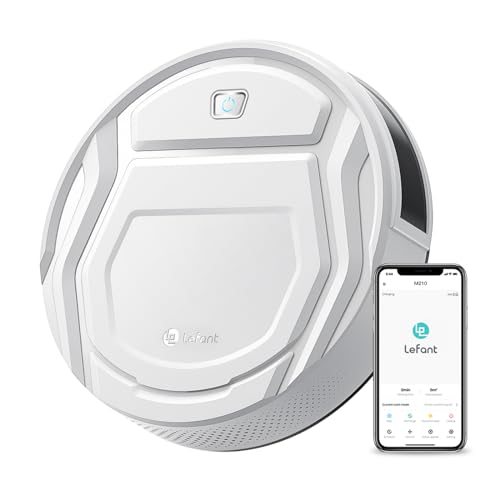
Lefant Robot Vacuum Cleaner, Strong Suction, 120 Mins Runtime, Slim, Low Noise, Automatic Self-Charging, Wi-Fi/App/Alexa Control, Ideal for Pet Hair Hard Floor and Daily Cleaning, M210
This Lefant M210 robotic vacuum cleaner is good for families with pets.
As an affiliate, we earn on qualifying purchases.
As an affiliate, we earn on qualifying purchases.