To clean better without overworking your vacuum, regularly inspect and clear debris from the brush roll, hoses, and filters. Follow a cleaning schedule based on your household’s needs, focusing on high-traffic areas often. Use gentle, slow strokes and avoid excessive force during use. Keep your vacuum well-maintained by replacing worn belts, filters, and bags promptly. Proper storage and routine upkeep help extend its lifespan and efficiency. Stay with us to discover more tips for excellent vacuum care.
Key Takeaways
- Clear blockages and debris from hoses and filters before vacuuming to maintain optimal suction.
- Use slow, steady strokes rather than excessive passes over the same area.
- Empty the dustbin or replace the bag regularly to prevent loss of suction.
- Schedule cleaning for high-traffic areas more frequently to reduce strain on the vacuum.
- Perform routine maintenance, such as replacing filters and belts, to keep the vacuum running efficiently.
Cleaning efficiently is vital if you want to keep your space spotless without wearing out your vacuum prematurely. To do that, you need to prioritize proper vacuum maintenance and establish a consistent cleaning schedule. Regular maintenance ensures your vacuum runs smoothly, while a well-planned cleaning schedule prevents you from overworking it. When you neglect these steps, you risk damaging the motor, clogging filters, or reducing suction power, which can lead to more frequent replacements and higher costs over time.
Proper vacuum maintenance and a consistent schedule prevent damage and save money over time.
Start by inspecting your vacuum after each use. Check the brush roll for hair, string, or debris that can hamper its spinning ability. Clearing out blockages from the hose and filters also helps maintain peak suction. Vacuum maintenance isn’t just about cleaning the parts; it’s about recognizing when components need replacing. Replace filters as recommended by the manufacturer—typically every few months—and keep an eye on the belt, replacing it if it shows signs of wear or breaks. These small steps can considerably extend your vacuum’s lifespan and keep it functioning effectively.
Creating a cleaning schedule is equally important. Instead of sporadically vacuuming, plan regular sessions based on your household’s needs. For high-traffic areas, a daily or every-other-day routine might be necessary, while less-used rooms can be cleaned weekly. This consistency prevents dirt and debris from accumulating excessively, which would otherwise require more effort and strain your vacuum. Additionally, using proper cleaning techniques can help prevent unnecessary wear and tear. Incorporating regular maintenance into your routine can also minimize the risk of unexpected breakdowns. Following a recommended maintenance schedule can further optimize your vacuum’s performance and longevity. Maintaining awareness of the importance of routine upkeep can help you identify early signs of trouble before they become costly repairs. Stick to your schedule, and you’ll notice that cleaning becomes less of a chore and more of a routine that keeps your home spotless without overburdening your equipment.
Using your vacuum correctly also plays a role in preventing unnecessary wear. Avoid pushing the vacuum with excessive force or running it over the same spot repeatedly. Instead, use slow, steady strokes and make multiple passes in areas with stubborn dirt. When you’re done cleaning, empty the dustbin or replace the bag before it’s completely full. A full dustbin reduces suction and makes your vacuum work harder, which accelerates wear and tear. Proper vacuum maintenance is essential for preserving its performance and longevity.
Finally, don’t forget to store your vacuum properly. Keep it in a dry, cool place, and avoid wrapping the cord tightly around the machine, which can damage the cord over time. By maintaining your vacuum and following a consistent cleaning schedule, you guarantee it stays in top shape. This way, you clean better without overworking your vacuum, saving you time, money, and effort in the long run.
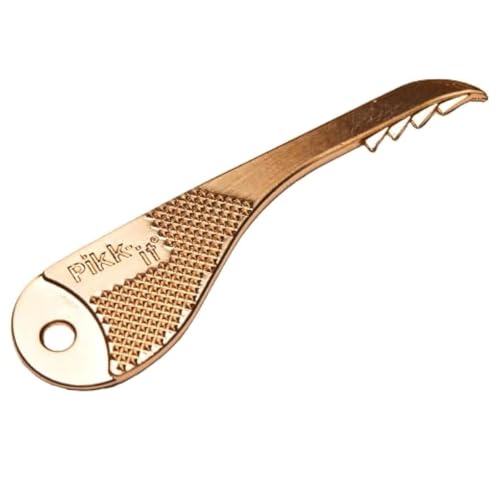
Pikk-it® Vacuum Hair Brush Cleaner Tool, Pet & Human Hair Removal Comb Rake
- Universal Compatibility: Works with any vacuum, including Dyson
- Designed for Hair Removal: Removes animal and human hair easily
- Sharp Metal Teeth: Zinc alloy teeth cut through hair and tangles
As an affiliate, we earn on qualifying purchases.
As an affiliate, we earn on qualifying purchases.
Frequently Asked Questions
How Often Should I Replace My Vacuum Filters?
You should replace your vacuum filters every 3 to 6 months, depending on usage. Regular air filter maintenance guarantees your vacuum runs efficiently, and it’s especially important for HEPA filters, which typically have a lifespan of about six months to a year. Keep an eye on filter performance; if airflow decreases or odors persist, it’s time for a replacement to maintain peak cleaning and air quality.
Can I Clean My Vacuum’s Brush Roll With Water?
Imagine you’re channeling a bit of Victorian ingenuity—yes, even in vacuum maintenance. You can clean your vacuum’s brush roll with water, but only if you remove it first. Use a brush or cloth to clear debris, then gently wash the brush roll with water. Make sure it’s completely dry before reinstalling to avoid damage. Regular brush roll cleaning helps maintain suction and prolongs your vacuum’s life.
What’s the Best Way to Prevent Vacuum Clogging?
To prevent vacuum clogging, focus on airflow maintenance and debris prevention. Regularly check and clear your vacuum’s filters, hoses, and brushes to guarantee unobstructed airflow. Avoid picking up large or sharp debris that can cause blockages. Empty the dustbin or replace bags frequently, especially when full. By maintaining good airflow and removing debris promptly, you keep your vacuum running efficiently and reduce the chances of clogs.
How Do I Store My Vacuum to Prolong Its Life?
When it comes to vacuum storage, don’t let it gather dust in a forgotten corner. Store your vacuum in a dry, cool place, preferably hanging or upright to avoid damaging the brush roll and motor. Regularly empty and clean filters before storing. Proper vacuum storage extends its lifespan, ensuring it works efficiently when you need it most. Think of it as giving your vacuum a little TLC to keep it running smoothly longer.
Are There Eco-Friendly Vacuum Cleaning Tips?
Yes, you can practice eco-friendly cleaning by using sustainable vacuum tips. Opt for vacuums with energy-efficient settings and reusable filters to reduce waste. Regularly clean and replace filters to maintain performance and extend your vacuum’s lifespan. Use eco-friendly cleaning solutions and avoid harsh chemicals. These sustainable vacuum tips help minimize environmental impact while keeping your space clean, making your cleaning routine more eco-conscious and effective.
Conclusion
By following these tips, you can keep your home spotless without overworking your vacuum. Remember, cleaning smart is more effective than just cleaning hard. Did you know that regular maintenance can extend your vacuum’s lifespan by up to 50%? That’s a win for your wallet and the environment. So, take a few extra minutes to clean filters and bags, and your vacuum will thank you with better performance and longevity. Happy cleaning!