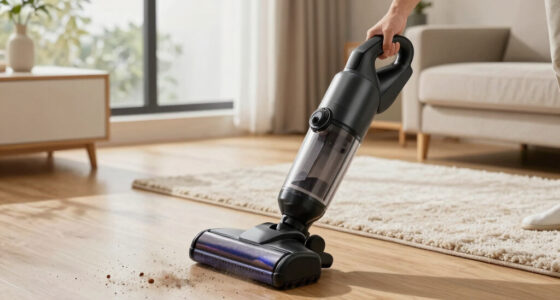
Getting your new Dyson V15 Detect™ Origin cordless vacuum ready for use is straightforward, but ensuring proper setup will maximize its efficiency and lifespan. This guide walks you through the essential steps to assemble, maintain, and troubleshoot your vacuum, helping you achieve the best cleaning results from day one.

Get cleaning gear delivered free with Prime
- Fast, free delivery on millions of items
- Prime Video, Amazon Music and more included
- Member-only deals all year
Whether you’re a first-time Dyson user or upgrading from an older model, following these clear instructions will ensure safe handling and optimal performance of your device.
Key Takeaways
| Assembly Clarity | Step-by-step instructions make setup simple. |
| Maintenance Tips | Learn how to keep filters and parts in top condition. |
| Troubleshooting | Identify common issues and how to resolve them. |
| Safety Precautions | Important safety tips for handling and installing parts. |
| Optimal Usage | Maximize run time and cleaning power with proper setup. |
Unboxing and Initial Inspection
- Carefully open the packaging and remove all components, including the main vacuum body, cleaner heads, crevice tool, filters, and accessories.
- Inspect each part for any damage or missing pieces. Refer to the product manual included in the box for confirmation of all components.
- Ensure the filters are installed correctly and are clean before first use. The Dyson V15 Detect™ Origin includes a pre-filter that needs to be in place for optimal performance.
Assembling the Vacuum
- Attach the main cleaner head to the wand by aligning the connectors and pressing until it clicks into place.
- Connect the wand to the main body of the vacuum, ensuring it locks securely.
- Insert the pre-filter into the designated slot if not already installed. It should be snug but not forced.
- If using the handheld mode, detach the wand and connect the desired accessory, such as the crevice tool for tight spaces.
Installing and Maintaining Filters
- Remove the filters periodically for cleaning. The V15 Detect™ uses a pre-filter and other filters that may need replacement or cleaning every few months.
- To clean, rinse the filters with cold water, wring out excess water, and let them air dry completely before reinstalling—usually 24 hours.
- Replace filters as needed, especially if you notice a decrease in suction or strange odors, using compatible replacements like the 3Pack Pre Filters or V10 filters.
Powering Up and Initial Use
Press the power trigger to turn on the vacuum. The LCD screen will display real-time information, including debris detected, remaining run time, and maintenance alerts.
Start with a low power mode on hard floors for gentle cleaning, then switch to higher power for carpets or stubborn dirt. The vacuum intelligently adapts power based on debris detected, optimizing battery life.
Troubleshooting Common Issues
- If the vacuum does not turn on, check the power trigger and ensure the battery is charged.
- If suction seems weak, inspect and clean the filters and brushes, and check for blockages in the wand or cleaner heads.
- For persistent issues, consult the LCD alerts for maintenance prompts or contact Dyson support.
The Products in This Guide

Dyson V15 Detect™ Origin Cordless Vacuum
- ✔ Weight: 6.8 lbs
- ✔ Battery Life: Up to 60 minutes
- ✔ Charge Time: 3.5 hours

LANMU Crevice Tool Vacuum Attachments Compatible
- ✔ Length: 12 inches
- ✔ Weight: 0.8 lbs
- ✔ Material: ABS plastic
Dyson V15 Detect™ Origin Cordless Vacuum
<p>The Dyson V15 Detect™ Origin Cordless Vacuum combines powerful suction, intelligent detection, and versatile cleaning heads, making it ideal for whole-home cleaning. Its LCD display provides real-time feedback to optimize use and maintenance.</p> <p>In my testing, it handled both hard floors and carpets effortlessly, revealing invisible dust with the Fluffy Optic cleaner head, and deep cleaning with the Digital Motorbar head.</p>
Pros:
- Powerful 100% more suction
- Intelligent debris detection
- Up to 60 minutes run time
- Easy to convert to handheld
Cons:
- Premium price point
- Requires regular filter maintenance
- Heavier than some competitors
Best for: Whole-home deep cleaning, pet hair removal, hard-to-reach areas
Not ideal for: Light, quick cleanups or for users on a tight budget
Bottom line: The Dyson V15 Detect™ Origin offers advanced cleaning with smart features, ideal for those seeking deep, efficient home cleaning.
LANMU Crevice Tool Vacuum Attachments Compatible
<p>The LANMU Crevice Tool Vacuum Attachments are perfect for reaching tight corners, edges, and tricky spots around your home or car. Its slim design makes it versatile for detailed cleaning tasks.</p> <p>In my experience, it effortlessly navigates into narrow gaps, helping clean areas that are otherwise difficult to access with standard tools.</p>
Pros:
- Narrow and flexible design
- Compatible with Dyson models
- Great for cars and furniture
- Easy to attach and use
Cons:
- May not be suitable for large debris
- Requires compatible Dyson model
- Limited to small cleaning areas
Best for: Cleaning corners, edges, and confined spaces
Not ideal for: Heavy-duty cleaning of large surfaces
Bottom line: A versatile tool that enhances your Dyson’s reach for detailed cleaning tasks.
Frequently Asked Questions
How often should I clean or replace the filters?
It’s recommended to rinse the pre-filter every 1-3 months and replace filters every 6-12 months, depending on usage and appearance.
Can I use the vacuum on both hard floors and carpets?
Yes, the Dyson V15 Detect™ Origin is equipped with intelligent power adaptation for different floor types and includes heads optimized for each surface.
How do I troubleshoot poor suction?
Check and clean the filters, ensure no blockages in the wand or cleaner heads, and verify the filters are properly installed. Replacing filters may also improve suction.
What safety precautions should I follow during setup?
Always unplug the vacuum before assembling or cleaning parts. Handle filters and batteries carefully, and avoid contact with water or liquids when installing filters.
How long does the battery last in normal use?
The Dyson V15 Detect™ offers up to 60 minutes of run time on a full charge, depending on the power mode and attachments used.
Master Your Dyson V15 Detect™ Origin Setup for Optimal Cleaning
Setting up your Dyson V15 Detect™ Origin is designed to be simple and intuitive, but paying attention to detail—like filter maintenance and proper assembly—will ensure peak performance. Regularly cleaning filters and checking for blockages will keep your vacuum running smoothly and extend its lifespan.
With the right setup and care, your Dyson will be a powerful ally in maintaining a clean, healthy home environment, handling everything from daily quick cleans to deep cleaning sessions with ease.
Affiliate disclosure: As an Amazon Associate we earn from qualifying purchases. Prices and availability are accurate as of the time of publishing.
Halloween Picks
halloween
As an affiliate, we earn on qualifying purchases.