If your Dyson V15 Detect™ Origin Cordless Vacuum is pulsing on and off, it can be frustrating and hinder your cleaning. This issue often indicates a problem with the filter, battery, or air flow. Fortunately, most causes are simple to diagnose and fix with some basic steps. In this guide, you’ll find clear instructions to troubleshoot and resolve the pulsing problem safely and effectively.

Get cleaning gear delivered free — and shop member deals
- Fast, free delivery on millions of items
- Access to Prime Big Deal Days deals on October 6–7
- Prime Video, Amazon Music and more included
Following these steps can restore your vacuum’s optimal performance, ensuring you get the deep cleaning power you expect from Dyson. Always remember to disconnect the vacuum from charging or power sources before performing maintenance or troubleshooting.
Key Takeaways
| Filter issues | Dirty or clogged filters can cause pulsing. |
| Battery and power | Battery problems or low charge may trigger pulsing. |
| Airflow blockages | Obstructions in the wand or cleaner head reduce efficiency. |
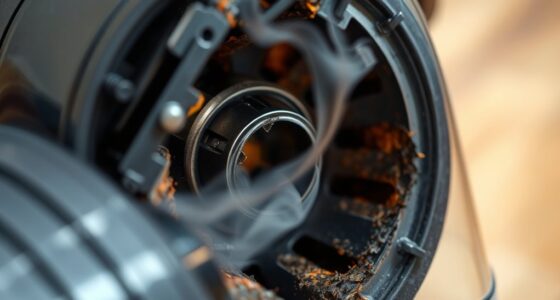
| Sensor and motor checks | Malfunctions in sensors or motor can cause pulsing. |
| Regular maintenance | Keeping filters clean and filters replaced prevents issues. |
Step 1: Power Down and Prepare
- Ensure the vacuum is turned off and disconnected from any charging station.
- Remove the battery if possible, following your model’s instructions, to safely access internal parts.
Step 2: Clean or Replace the Filters
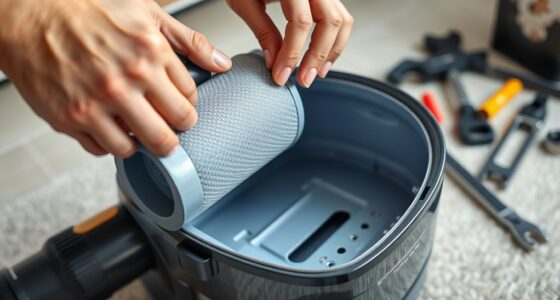
Dirty filters are a common cause of pulsing. Remove the pre-filter and main filter from your Dyson V15. Rinse them thoroughly with water, ensuring they are completely dry before reinstalling. If filters are worn or damaged, replace them with compatible options like the 3Pack Pre Filters Replacement or V10 Filters, depending on your model.
Step 3: Check for Airflow Blockages
- Inspect the wand, cleaner head, and hose for debris or obstructions.
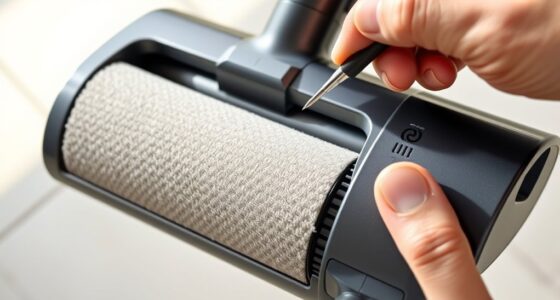
- Remove any tangled hair, dust, or debris that might restrict airflow.
- Use a crevice tool, like the LANMU Crevice Tool Vacuum Attachments, to reach tight spots.
Step 4: Examine the Battery and Power Settings
Ensure the battery is charged. If the pulsing persists, try resetting the vacuum by turning it off, removing the battery, waiting a few minutes, then reattaching it. Check if the power mode settings are appropriate for your cleaning task—using the LCD screen to monitor remaining run time and alerts.
Step 5: Test and Perform Maintenance
Reassemble the vacuum, turn it on, and test the pulsing. If the issue remains, consider replacing filters or contacting Dyson support. Regular maintenance, including filter replacements and airflow checks, will prevent future problems.
The Products in This Guide

Dyson V15 Detect™ Origin Cordless Vacuum
- ✔ Battery Life: 60 mins
- ✔ Filtration: HEPA washable filters
- ✔ Weight: Approx. 6.8 lbs

LANMU Crevice Tool Vacuum Attachments Compatible
- ✔ Compatibility: Multiple Dyson models
- ✔ Material: Plastic
- ✔ Design: Slim and flexible
Dyson V15 Detect™ Origin Cordless Vacuum
<p>The Dyson V15 Detect™ Origin Cordless Vacuum offers powerful, intelligent cleaning with features like invisible dust detection and adaptive power. Its LCD screen provides real-time data, making troubleshooting easier. While pulsing can be caused by various issues, regular maintenance and following these troubleshooting steps can keep your vacuum performing at its best.</p>
Pros:
- Powerful suction
- Intelligent dust detection
- Long battery life
- Versatile cleaning modes
Cons:
- Filter maintenance required
- Can be heavy for prolonged use
- Pricey replacement filters
Best for: Deep cleaning of hard floors and carpets with pet hair
Not ideal for: Light cleaning or quick pickups
Bottom line: A high-performance vacuum that benefits from regular upkeep and troubleshooting.
LANMU Crevice Tool Vacuum Attachments Compatible
<p>The LANMU Crevice Tool Vacuum Attachments compatible with Dyson models offers a flexible, narrow nozzle ideal for hard-to-reach areas. Using this attachment can help clear blockages that might cause pulsing and improve airflow for better performance.</p>
Pros:
- Narrow, flexible design
- Easy to attach
- Great for corners and edges
- Compatible with multiple Dyson models
Cons:
- Requires additional storage space
- Not a Dyson brand
- Limited to crevice cleaning
Best for: Cleaning tight corners, car interiors, and baseboards
Not ideal for: Heavy-duty cleaning tasks
Bottom line: A versatile tool for targeted cleaning and airflow improvement.
Frequently Asked Questions
Why does my Dyson vacuum keep pulsing on and off?
This often occurs due to airflow blockages, dirty filters, or battery issues. Troubleshooting these areas usually resolves the problem.
How often should I replace the filters?
Filters should be washed every 1-3 months and replaced every 6-12 months, depending on usage and model. Using compatible filters like the 3Pack Pre Filters or V10 Filters helps maintain performance.
Can I fix the pulsing myself?
Yes, most issues are manageable with cleaning filters, checking for obstructions, and ensuring the battery is charged. If problems persist, contacting Dyson support is recommended.
What tools can help detect or fix airflow issues?
A crevice tool like the LANMU attachment can help reach tight spots and dislodge blockages, improving airflow and stopping pulsing.
Is it safe to rinse the filters?
Yes, most Dyson filters are washable. Make sure they are fully dry before reinstalling to prevent damage or mold growth.
Keep Your Dyson V15 Detect in Peak Condition
Regular maintenance and prompt troubleshooting can prevent pulsing issues and extend the life of your Dyson cordless vacuum. By cleaning filters, checking airflow paths, and ensuring your battery is healthy, you can enjoy consistent, powerful cleaning performance. If problems persist despite these steps, reaching out to Dyson support or replacing filters with recommended parts may be necessary for optimal operation.
Affiliate disclosure: As an Amazon Associate we earn from qualifying purchases. Prices and availability are accurate as of the time of publishing.
Fall Picks
fall essentials
As an affiliate, we earn on qualifying purchases.